Features How It Works Pricing Contact My Account
Authorized HubSpot & QuickBooks Partner Since 2017

Your Accounting on
Autonomous Pilot

Enterprise-grade sync between HubSpot and QuickBooks Online. Choose fully autonomous or approval-based sync — your workflow, your rules.

Start Free Trial See How It Works
HubSpot HubSpot CRM Contacts, Deals, Products
SyncQ AUTONOMOUS
QuickBooks QuickBooks Online Invoices, Estimates, Payments
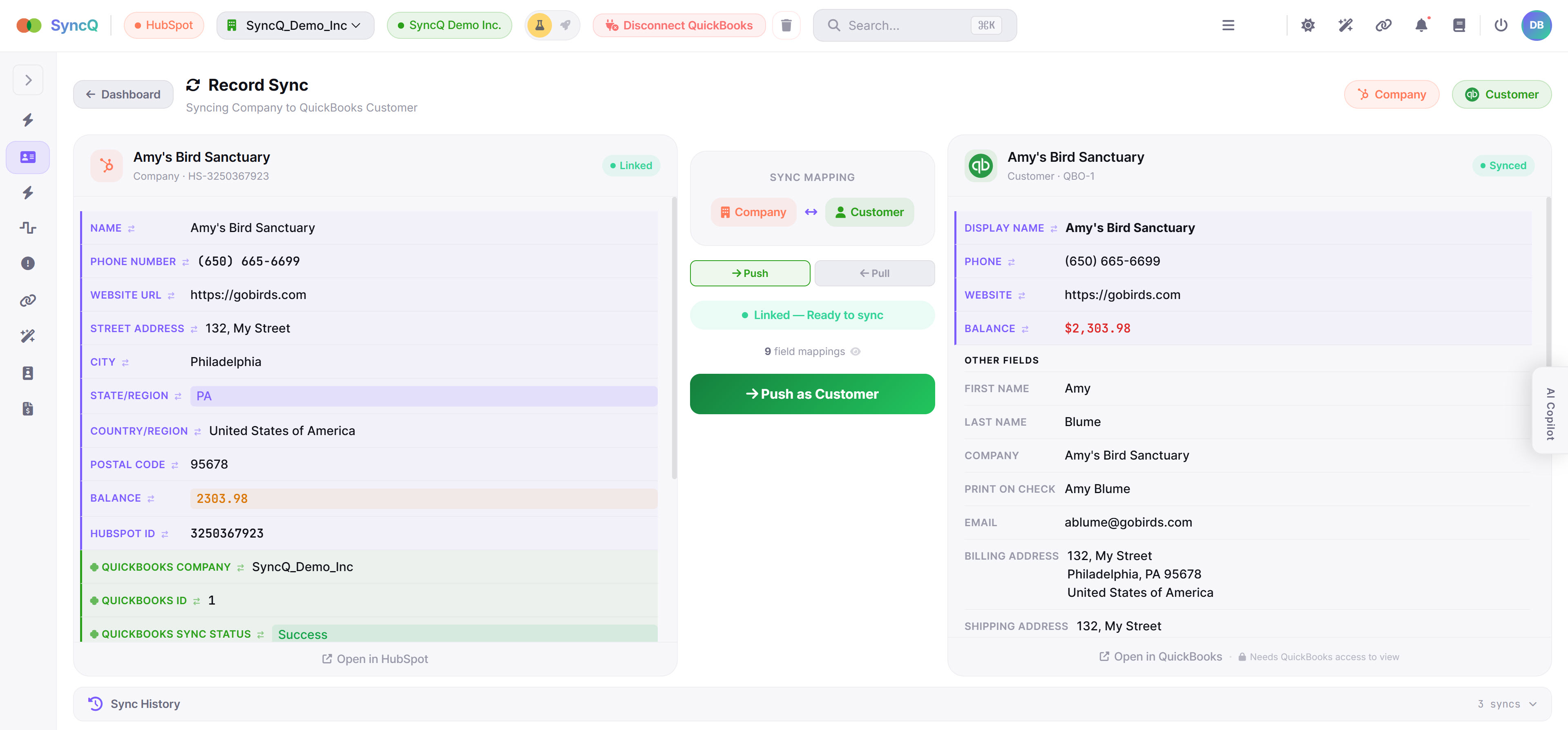
SyncQ Record Sync — side-by-side HubSpot and QuickBooks data with Push and Pull
Trusted By
HubSpot Authorized
QB QuickBooks Authorized
NIST 800-30 Compliant
AES-256 Encrypted
Trusted by businesses worldwide
4Media ACA Calleva CropMetrics GetGlow Global One Huntsman Lunababe Martiele New Horizons Qwil Recollective Shield Solo Symbee Texan TopTrainer Zego 4Media ACA Calleva CropMetrics GetGlow Global One Huntsman Lunababe Martiele New Horizons Qwil Recollective Shield Solo Symbee Texan TopTrainer Zego

Choose How SyncQ Runs Your Sync

Like choosing between autopilot and co-pilot. SyncQ gives you full control over how your data flows between HubSpot and QuickBooks.

Full Control

Approval Mode

Every sync suggestion appears in your Sync Feed for review. You decide what gets synced — approve, skip, or modify each record.

  • Review each record before sync
  • Approve or skip with one click
  • SyncQ Copilot suggestions
  • Ideal for sensitive accounting data
  • Audit trail for every action

Enterprise-Grade Flexibility

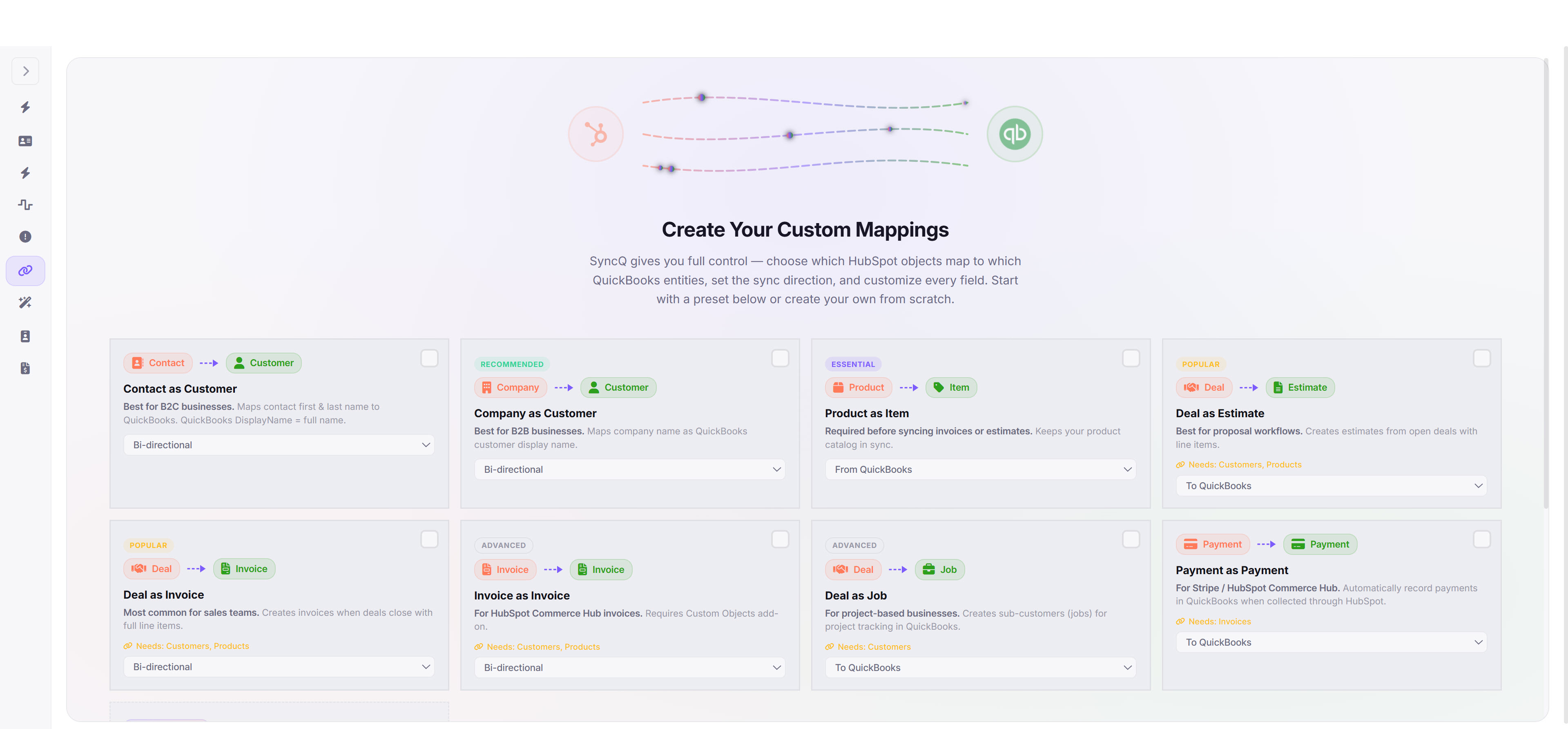
100% custom mapping tailored to your unique business workflow, fine-tuned over years in your specialized domain.

SyncQ custom mapping presets — Contact, Company, Product, Deal to QuickBooks

Bi-Directional Sync

Sync from HubSpot to QuickBooks, QuickBooks to HubSpot, or both — independently configurable per entity mapping.

Custom Field Mapping

Map any HubSpot field to any QuickBooks field including custom properties. Contacts, Companies, Deals, Products, Tickets — all supported.

Multi-Line Invoices

Deal line items sync as multi-line Invoices, Estimates, Bills, Sales Receipts, and Purchase Orders in QuickBooks automatically.

Multiple QB Companies

Connect multiple QuickBooks companies to a single HubSpot portal. Each with independent mappings and sync direction.

Payment Tracking

Automatically import Payment transactions, Sales Receipts, and Customer balances from QuickBooks to HubSpot Contacts and Deals.

Enterprise Security

AES-256-CBC encryption, NIST 800-30 risk assessments, direct API connections — your data never passes through third-party servers.

Powerful Visual Mapping

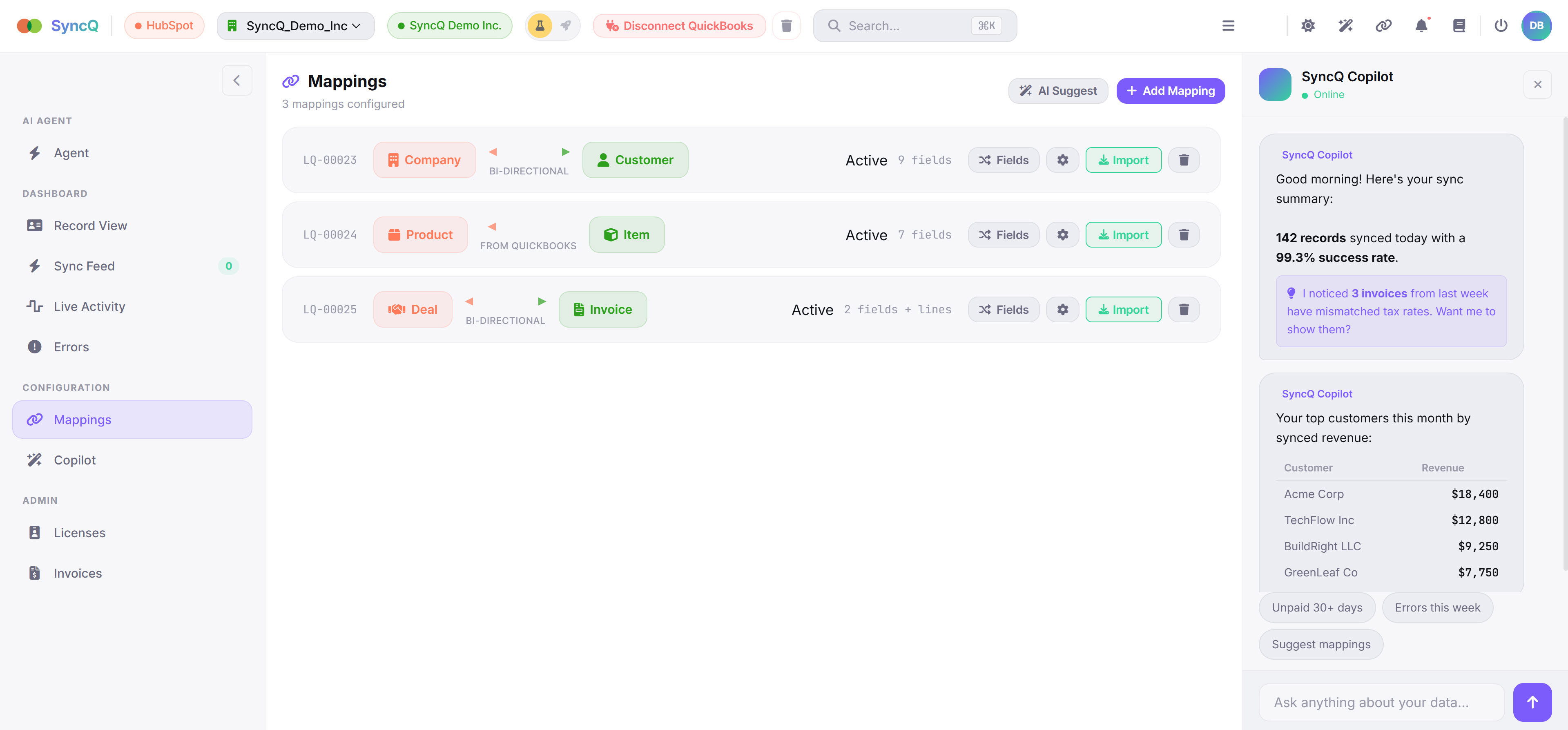
SyncQ entity mappings dashboard with AI Copilot
Entity Mappings

Visual Entity Mappings with AI Copilot

See all your HubSpot-to-QuickBooks mappings at a glance — Company to Customer, Product to Item, Deal to Invoice. Each with sync direction, field count, and one-click import.

SyncQ Copilot provides real-time sync summaries, flags mismatched records, and surfaces your top customers by synced revenue — all in a conversational AI panel.

Company → CustomerProduct → ItemDeal → Invoice AI CopilotBi-Directional
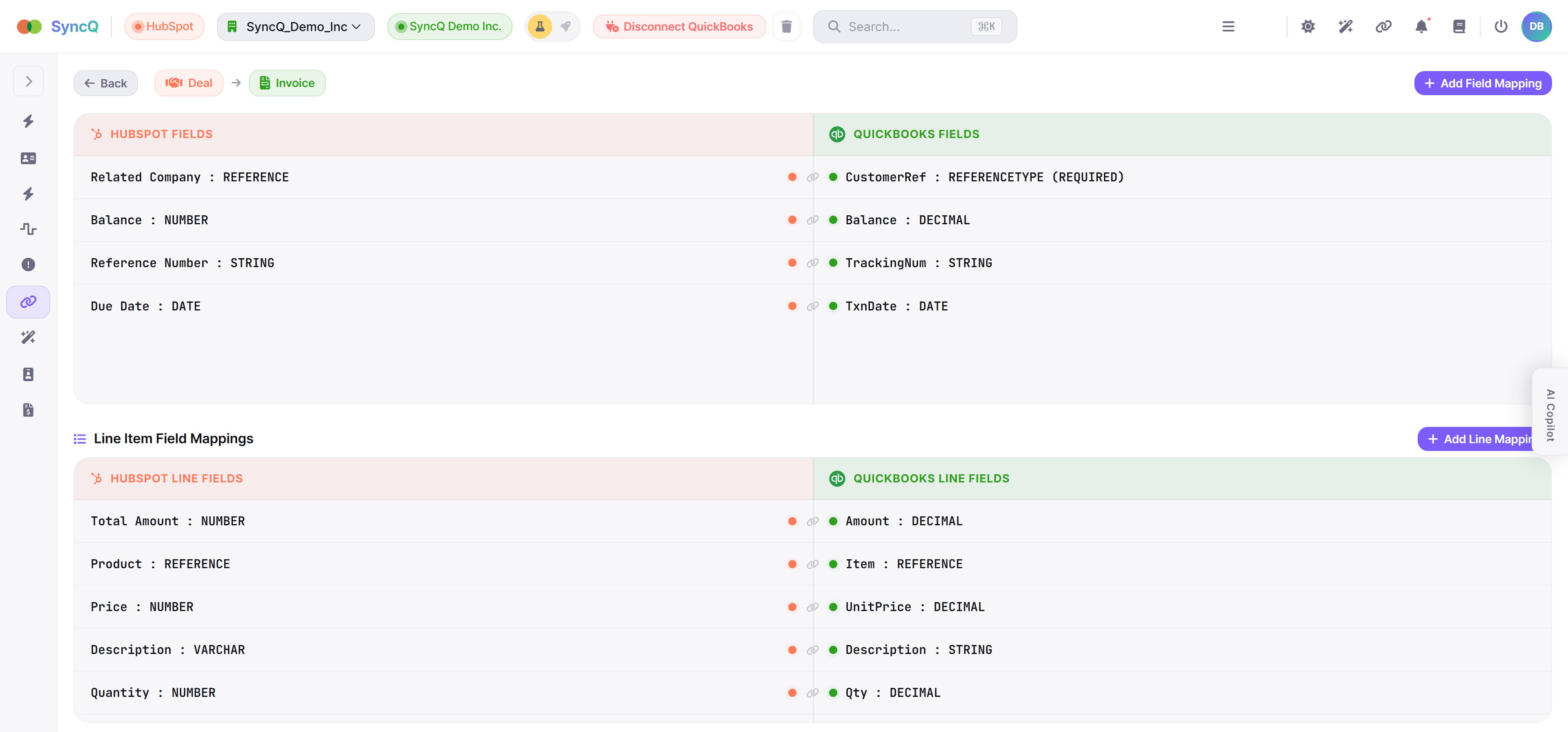
SyncQ field-level mapping — Deal to Invoice with line items
Field Mapping

Granular Field-Level Mapping

Map every HubSpot field to its QuickBooks counterpart — Related Company to CustomerRef, Balance to Balance, Due Date to TxnDate. Full type-aware mapping with data validation.

Multi-line deal syncing maps line items individually: Product to Item, Price to UnitPrice, Quantity to Qty, Description to Description — creating complete multi-line Invoices automatically.

Header FieldsLine ItemsCustom Properties Type MatchingRequired Fields
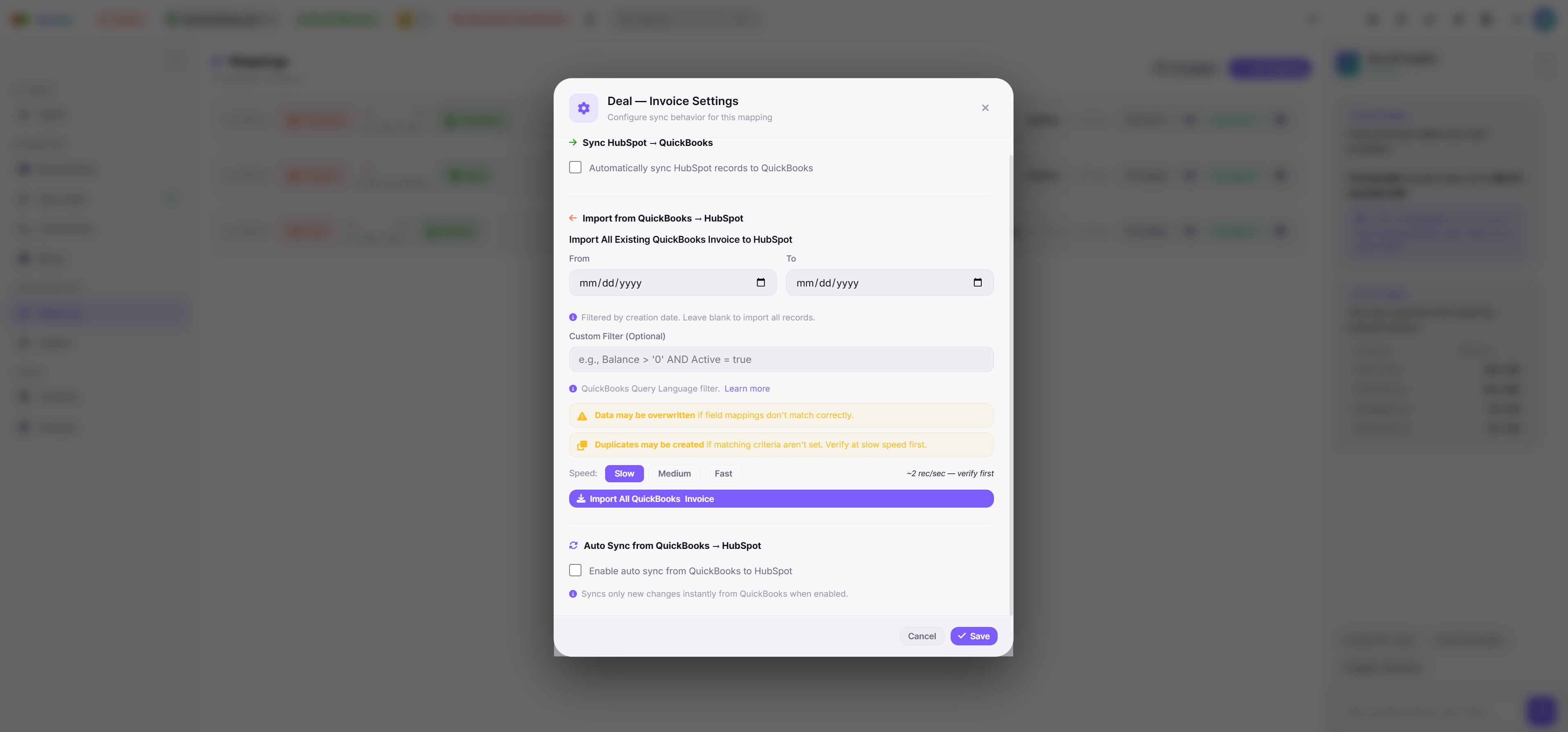
SyncQ import and auto-sync settings for Deal to Invoice
Sync Settings

Auto-Sync & Historical Import

Enable automatic sync from HubSpot to QuickBooks or QuickBooks to HubSpot — independently per mapping. New records sync instantly via webhooks with zero manual effort.

Import all existing QuickBooks records to HubSpot with date filters, custom query filters, and adjustable speed. Verify at slow speed first, then ramp up for bulk historical imports.

Auto SyncBulk ImportDate Filters Custom QueriesSpeed ControlWebhook Triggers

Up and Running in Minutes

No coding required. Designed for business owners and accountants. Free setup assistance available.

1

Install SyncQ

Install SyncQ from the HubSpot Marketplace. Connect and authorize your QuickBooks Online account in one click.

2

Map Your Fields

Use our visual mapper to connect any HubSpot type to any QuickBooks type. Map custom fields with simple dropdowns — full flexibility.

3

Start Syncing

Choose autonomous or approval mode. Set sync directions per mapping. Your accounting runs on autopilot while you focus on growing your business.

Built by Real People, For Real Businesses

We attend industry conferences, meet our users, and continuously improve SyncQ based on real accounting workflows.

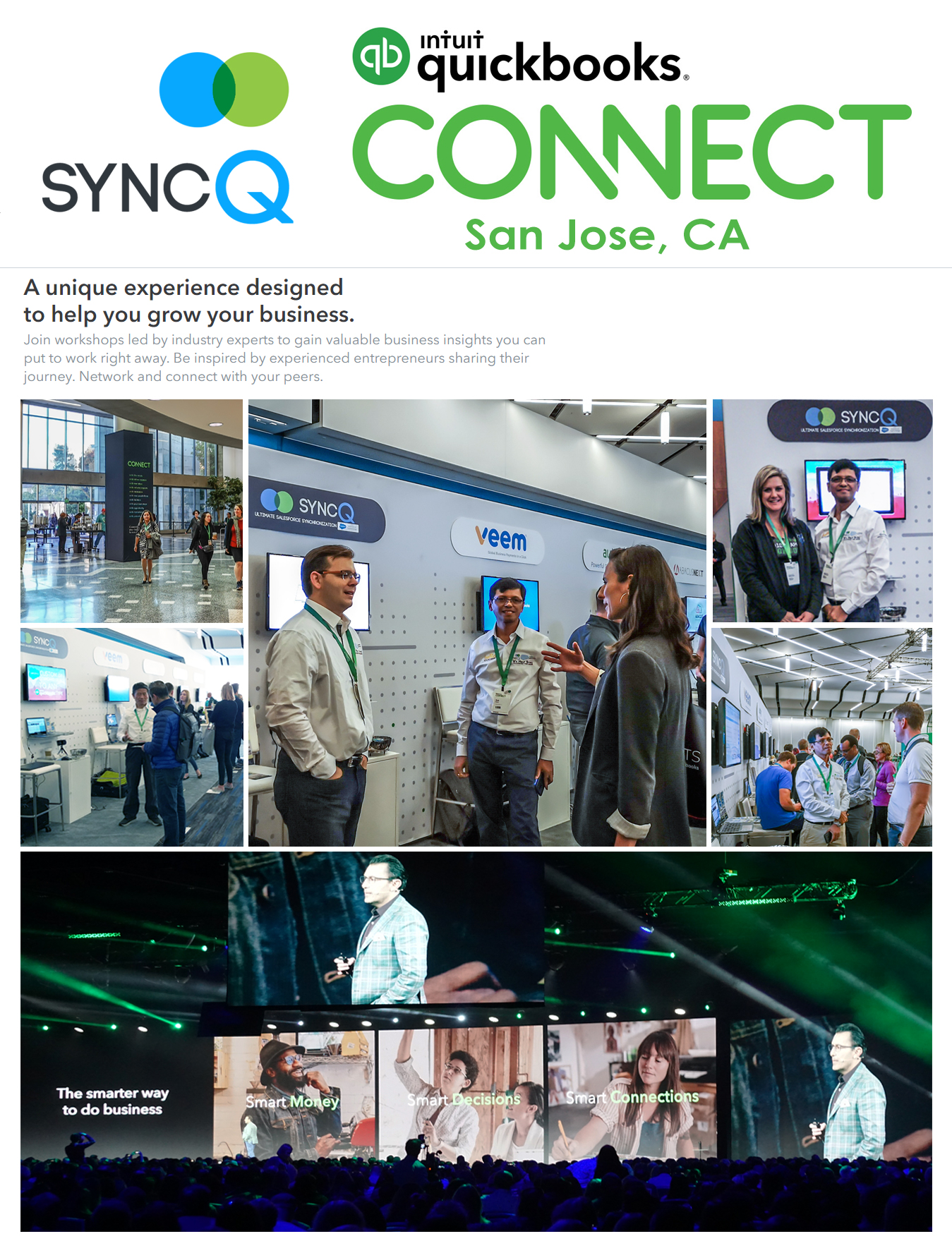
SyncQ team at QuickBooks Connect conference
QuickBooks Connect Conference SyncQ team showcasing the HubSpot-QuickBooks integration to accounting professionals and business owners

From Connection to Sync in Clicks

SyncQ mappings dashboard with Copilot
Mappings + AI Copilot
Field-level mapping Deal to Invoice
Field Mapping
Record sync side-by-side view
Record Sync View
Import and auto-sync settings
Sync Settings

Automating Accounting Since 2017

8+
Years in Production
1M+
Records Synced
99.9%
Uptime SLA
2
Authorized Partnerships

Plans That Scale With You

14-day free trial on all plans. No credit card required to start.

Professional
For small teams getting started
$49/mo
Includes 2 licenses. Effective $24.50/mo/user
Start Free Trial
  • HubSpot Contacts, Companies, Products & Deals
  • Bi-directional sync with QuickBooks
  • Manual and Automated sync
  • Unlimited syncs
  • Customer AI insights
  • QB Customers & Vendors to HubSpot
  • Auto-import Estimates, Invoices & Sales Receipts to Deals
  • Import Payments & Sales Receipts to Contacts/Companies
Corporate
For organizations with large teams
$199/mo
Includes 10 licenses. Effective $19.90/mo/user
Start Free Trial
  • Everything in Business Max
  • HubSpot Custom Object sync
  • QB Deposits, POs, Accounts, Tax Codes, Bills & more
  • Custom workflow-based fully automated sync
  • Auto-import to Deals or Custom Objects
  • Sync Estimates, Invoices, Payments to Contact/Company notes
  • Dedicated onboarding & phone support
  • Free setup assistance included

All plans include a 14-day free trial. No credit card required. Cancel anytime before your trial ends with no charges. Annual billing available for Professional plan at $382/year (35% savings). Need help with setup? Contact support@syncq.net for free configuration assistance.

Ready to Put Your Accounting
on Autopilot?

Join businesses that save hours every week with autonomous HubSpot + QuickBooks sync.

Start Free Trial Schedule Demo